-
Hajipur, Bihar, 844101
Python Roadmap for Beginners to Job Ready (2026)

Published By
Bikki SinghI’ve spent enough time interviewing developers to know exactly what’s buzzing in your head right now.. It’s 2026. You keep hearing that coding is dead, that AI writes everything now, and that the "junior developer" role is a thing of the past. Let me give it to you straight: that’s total nonsense.
What is dead is the era of the lazy coder—the person who just copy-pastes from a tutorial without understanding the "why." In 2026, being a Python developer is about being a problem solver who knows how to use the best tools on the planet. If you are a beginner with no coding background, or a college student trying to navigate this new landscape, you don't need a miracle. You need a plan.
This is your Complete Python Learning Path 2026. I’m going to walk you through the exact steps to go from knowing nothing to being a professional software engineer. No fluff, no "get rich quick" promises—just the hard truth about what it takes to get hired today.
Why Python 3.13 in 2016?
Before you write your first line of code, you need to understand the environment you’re entering. We are currently using Python 3.13. This version is a massive deal because it introduced a way to run code much faster by removing some old limitations (like the Global Interpreter Lock, for the tech-curious).
When people ask me how to learn Python in 2026, I tell them to start with the most modern version. Don't waste time on old tutorials. The language is more efficient now, and the error messages actually tell you what you did wrong in plain English. That’s a huge win for beginners.
Getting Your Hands Dirty with the Right Tools
I see beginners making a huge mistake on day one: they use online compilers. If you want to be job ready, you need a professional setup.
-
Download Python 3.13: Go to the official site and get the latest version.
-
The Editor: Don't use Notepad. Download VS Code. It’s the industry standard.
-
Virtual Environments (venv): This is your first "pro" habit. Learn to create a Virtual Environment (venv) for every project. This keeps your libraries organized. If you don't do this, your computer will eventually become a graveyard of conflicting software versions.
Also Read: Top 10 Python Trends in 2025 Every Developer Should Follow
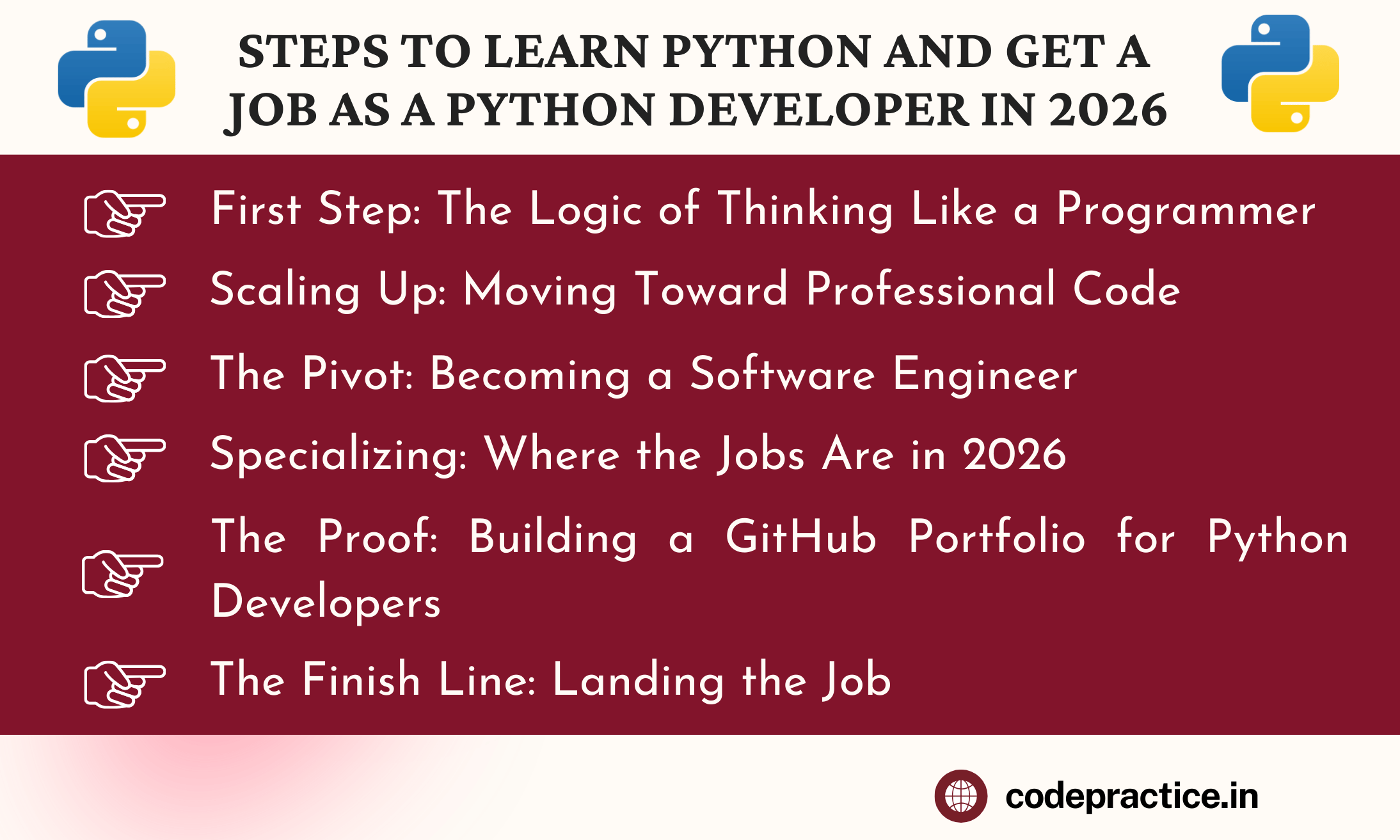
First Steps: The Logic of Thinking Like a Programmer
Most people think coding is about typing. It’s actually about logic. Your first two to three weeks should be spent mastering the "grammar" of Python.
Variables and Data Types
Everything in Python is data. You need to know how to store it.
-
Strings: For text.
-
Integers and Floats: For math.
-
Booleans: For True or False logic.
-
Lists and Dictionaries: These are the most important. A List is just an ordered group of things. A Dictionary is a way to look up information using a "key." If you’re building a contact list, the name is the key, and the phone number is the value.
Making Decisions with Control Flow
This is where your program starts to feel "smart." You’ll use if, elif, and else to tell the computer what to do under different circumstances. Then, you’ll master Loops. Instead of writing 100 lines of code to check 100 emails, you write a three-line for loop that does it for you in a second. This is the heart of Python Automation.
The Power of Functions
Stop repeating yourself. A function is a block of code that you name and reuse. If you write a script to calculate tax, don't write that math every time you need it. Put it in a function, call it when you need it, and keep your code clean.
Also Read: Coding Practice Roadmap for College Students: Learn Programming Step by Step
Scaling Up: Moving Toward Professional Code
Once you can write a script that runs, you need to learn how to write a system that lasts. This is where most beginners get stuck, but it’s also where the jobs are.
Object-Oriented Programming (OOP) in Python
This is the big one. Object-Oriented Programming (OOP) is how we build large applications. Think of it like a blueprint. If you’re building a game, you create a "Player" class. This class defines what every player has (name, health, score) and what every player can do (jump, run, shoot).
When you understand classes and objects, you stop writing "spaghetti code" and start building structures. Recruiters look for this specifically in your Python Developer Roadmap 2026. If you can't explain what a class is, you aren't ready for a professional team yet.
Error Handling
Professional code doesn't just work when everything is perfect; it works when things go wrong. Learn how to use try and except blocks. If your program tries to open a file that doesn't exist, it shouldn't just crash. It should tell the user, "Hey, I couldn't find that file," and keep running. This is called "graceful degradation," and it’s a hallmark of a senior developer.
Asynchronous Programming (asyncio)
In 2026, speed is everything. We don't want our programs to sit around waiting for a website to respond or a file to download. You need to learn Asynchronous Programming (asyncio). This allows Python to handle multiple tasks at once. It’s a bit of a brain-bender at first, but it’s a mandatory skill for modern web development and AI-integrated apps.
Also Read: Why Most Beginners Fail in Coding (And How to Avoid It)
The Pivot: Becoming a Software Engineer
You know the language now, but being a developer is about more than just Python. You need to know the ecosystem. This is the Python Roadmap for Software Engineers part of the journey.
Version Control with Git
If you don't know Git, you won't get hired. Sign up for GitHub immediately. Learn how to commit your changes and push them to a repository. This is how you prove you’re actually coding every day. It’s also how teams collaborate. If you break something, Git allows you to travel back in time to when the code actually worked. It’s a literal lifesaver.
Working with Databases and SQL
Python is great at processing data, but it’s terrible at storing it forever. You need to learn SQL. I recommend starting with PostgreSQL. You’ll learn how to create tables, save data, and pull it back out using Python libraries like SQLAlchemy. Every major app—from Instagram to Uber—is basically just a fancy way of putting data into a database and taking it out again.
Testing Your Code
In 2026, companies have zero patience for bugs that could have been caught. Learn Pytest. Writing a "test" is just writing a small script that checks if your main script works correctly. It might seem like extra work, but it’s the difference between a junior who breaks the site on Friday and a pro who sleeps soundly.
Specializing: Where the Jobs Are in 2026
By now, you’ve been coding for three or four months. You’re good. Now you need to pick a lane. Don't try to learn everything; pick one of these three paths and master it.
1. Modern Web Development
This is the most common path. In 2026, we’ve moved away from bloated frameworks.
-
The King: Learn FastAPI. It is incredibly fast, handles async tasks beautifully, and is easy to learn.
-
The Legend: Django is still used by massive companies for big, complex sites.
-
The Skill: Building REST APIs. This is how your Python backend talks to a mobile app or a React frontend.
2. Data Science and AI Integration
You don't need a PhD to work in AI anymore, but you do need Python.
-
The Libraries: Master Pandas and NumPy for data manipulation. Use Matplotlib or Seaborn to turn that data into charts.
-
AI Tools: Learn how to use Python to integrate with models like GPT-4 or local models. This is called "AI Engineering," and it’s one of the highest-paying roles in 2026.
-
The Goal: Build a system that takes messy data and turns it into a clear business prediction.
3. Automation and DevOps
If you like making things run smoothly behind the scenes, this is for you.
-
Web Scraping: Use BeautifulSoup or Playwright to pull data from websites.
-
Scripting: Write Python scripts that manage cloud servers or automate boring office tasks.
-
Docker: Learn how to "containerize" your Python apps so they run exactly the same on your laptop and the company’s server.
Also Read: How Much Coding Practice Is Enough to Get a Job? The 2026 Roadmap to Mastery
The Proof: Building a GitHub Portfolio for Python Developers
I’ve hired developers before, and I’ll tell you a secret: I rarely look at their degree. I look at their GitHub. A GitHub portfolio for Python developers is your real resume.
To be considered job ready, you need three solid projects. Not "To-Do" lists, but real tools.
-
A Data-Driven Web App: Build something using FastAPI that talks to a PostgreSQL database. Maybe it’s a movie recommendation engine or a personal budget tracker.
-
An Automation Script: Show that you can save time. Write a script that scrapes job postings from five different sites and sends you a daily email with the best matches.
-
A Modern AI Integration: Build a tool that uses an API to summarize long YouTube videos or analyze the sentiment of Twitter (X) threads.
Each project needs a "README" file that explains what the project does, how to run it, and what problems you solved. This shows me you can communicate, not just code.
The Finish Line: Landing the Job
You’ve got the skills and the portfolio. Now you need to pass the interview. This is where most people panic, but if you’ve followed this step by step Python guide for college students 2026, you’ll be fine.
1. Optimize Your LinkedIn
Use keywords that recruiters search for. Don't just say "I know Python." Say "Backend Developer specializing in FastAPI, PostgreSQL, and Asynchronous Programming." This makes you show up in their search results.
2. Practice Python Interview Questions 2026
Expect three types of questions:
-
Syntax Questions: "What’s the difference between a List and a Tuple?" (Hint: One can change, the other can't).
-
Coding Challenges: You’ll likely have to solve a logic puzzle on a screen. Use sites like LeetCode or HackerRank to practice, but don't overdo it. Focus on "Medium" difficulty.
-
System Design: "How would you build an API for a library?" They want to see how you organize your classes and databases.
3. Networking is a Skill
Don't just apply to 100 jobs a day on LinkedIn. Find developers who work at companies you like. Send them a polite message: "Hey, I’m a junior dev and I really admire the work your team did on [Project]. I’ve been working heavily with Python and FastAPI—would you mind if I asked one question about your tech stack?" You’d be surprised how often this leads to a referral.
How Long Does it Actually Take?
Let's be realistic about the timeline. If you have no coding background:
-
Months 1-2: Learning the basics, logic, and small scripts.
-
Months 3-4: Learning OOP, Git, Databases, and your specialization.
-
Months 5-6: Building your three main projects and refining your GitHub.
-
Months 7+: Applying, networking, and interviewing.
How long does it take to become a job-ready Python developer? About 6 to 9 months of consistent effort. If you’re a college student with some background, you might cut that down to 4 months. Anyone telling you that you can do it in 30 days is trying to sell you a course.
Also Read: Daily Coding Practice Routine for Beginners That Actually Works in 2026
Free Resources to Learn Python and Get a Job in 2026
You don't need to spend thousands on a bootcamp. The best resources are often free.
-
Official Python Docs: They are surprisingly readable now.
-
FreeCodeCamp: Their Python certification is legendary for a reason.
-
YouTube: Look for creators like Corey Schafer or ArjanCodes for deep architectural dives.
-
University MOOCs: The University of Helsinki offers a world-class Python course for free online.
Also Read: Best Python Libraries for AI and Machine Learning in 2025
Final Thoughts from Your Mentor
The path to becoming a developer is paved with frustration. You will spend four hours looking for a missing bracket. You will feel like you aren't "smart enough" to do this. I promise you, every single senior developer you see has felt that same way.
The difference between those who get hired and those who quit is simply persistence. In 2026, Python is more powerful than it has ever been. It is the language of the future, the language of AI, and the language of automation. If you stick to this roadmap, keep your GitHub active, and never stop building, you won't just find a job—you’ll build a career that can weather any storm.
Frequently Asked Questions (FAQs)
Q1: Is Python still worth learning for beginners in 2026?
Yes, Python remains the most relevant language in 2026 due to its dominance in AI, machine learning, and automation. With the release of Python 3.13 and its performance improvements, it is the primary "glue" language used to build and orchestrate modern AI agents and backend systems, making it a safe and lucrative choice for beginners.
Q2: How long does it take to become a job-ready Python developer from scratch?
On average, it takes 6 to 9 months of consistent study (about 10–15 hours per week) to become job-ready. While you can learn basic syntax in a month, mastering professional tools like FastAPI, SQL, and asynchronous programming, while building a portfolio, requires a dedicated medium-term commitment.
Q3: Can I get a Python developer job without a Computer Science degree in 2026?
Absolutely. In 2026, tech companies prioritize a "proof of work" over formal degrees. A strong GitHub portfolio featuring real-world applications—such as AI integrations, automated scrapers, or functional APIs—is often more valuable to recruiters than a diploma when proving your technical competency.
Q4: Which Python framework should I learn first: Django or FastAPI?
For most beginners in 2026, FastAPI is the better choice to learn first. It is modern, incredibly fast, and specifically designed for building the types of lightweight APIs that power AI applications. However, if you are targeting large enterprise companies with legacy systems, learning Django is still highly beneficial.
Q5: Will AI replace Python developers by 2026?
No, AI is not replacing Python developers; it is changing their workflow. In 2026, companies are looking for "AI-augmented" developers who can use Python to build, fine-tune, and maintain AI-driven applications. While AI can write simple code snippets, the human ability to design complex system architectures, debug logic, and ensure data security remains an irreplaceable skill in the job market.
Related Tags:
Python Roadmap 2026
Learn Python from Scratch
Python for Beginners
Career Guide 2026
Software Development
Python 3.13
FastAPI
Object-Oriented Programming
Asynchronous Python
Web Development
Data Science
AI Integration
Job Ready Skills
Coding for Students
Portfolio Building
Python Interview Prep
Self-Taught Programmer

Hi, I'm Bikki Singh — Full Stack Developer, coding language trainer, and founder of CodePractice.in. With 5+ years of hands-on web development experience, I've trained 500+ students across India in Python, PHP, Java, C, C++, MySQL, and front-end technologies like HTML, CSS, and JavaScript. I started CodePractice.in with one goal: make programming education practical, not theoretical. Every tutorial and blog I write is built around real projects and interview scenarios — so learners don't just understand code, they can actually use it.


Read Coding Blogs on Different Topics
Learn Our Free Tutorials on

Submit Your Reviews